Software
5 min read
Looking for Event Management Software for Nonprofits? Here's What to Look For
Not all event management software is built with nonprofits in mind. Here is exactly what to look for when every dollar counts, from volunteer tools to donation-friendly ticketing.
Finding the right event management software for nonprofits is rarely straightforward. Most platforms are built for corporate teams with deep budgets and zero need to collect donations at the door.
If you have ever tried to bolt a fundraising workflow onto a general-purpose ticketing tool, you already know the frustration. Fees eat into your revenue, volunteer coordination lives in a separate spreadsheet, and your attendees hit a checkout page that feels completely disconnected from your mission.
This guide cuts through the noise and tells you exactly what to evaluate before you commit to any platform.
The Four Features That Actually Matter for Nonprofit Events
1. Transparent, Low-Cost Pricing
Every dollar your platform takes is a dollar that does not go toward your cause. When you are evaluating pricing, look beyond the headline fee and ask these specific questions:
Is there a flat monthly fee, a per-ticket fee, or both?
Are payment processing fees passed to the attendee or absorbed by your organization?
Is there a free tier or a nonprofit discount that does not require a lengthy approval process?
Are there hidden fees for features like email communication, custom forms, or reporting?
A platform that charges a small per-ticket fee but lets you pass it to the buyer is often the most budget-friendly model for nonprofits running fundraisers. Flat monthly subscriptions can be a better fit if you run several events a year and want predictable costs.

A charity event in session
2. Donation-Friendly Ticketing
Selling a ticket and collecting a donation should feel like one seamless action for your attendee, not two separate transactions. Look for a platform that lets you:
Add an optional donation field directly in the checkout flow
Create ticket tiers like General Admission, Supporter, and Patron so donors can self-select their giving level
Issue receipts that clearly separate the tax-deductible donation amount from the ticket value
Accept both free and paid registrations in the same event
The checkout page is the last moment of inspiration before someone opens their wallet. If your platform cannot meet donors there with a clean, mission-aligned experience, you are leaving money on the table.
3. Volunteer Coordination Built Into the Platform
Volunteers are the backbone of most nonprofit events, yet most event software treats them as an afterthought. Shuttling between your event platform and a separate scheduling tool wastes coordinator time and creates gaps in communication. When you evaluate software, check whether it can handle:
Volunteer-specific registration flows with shift selection
Role-based check-in so a volunteer at the welcome table only sees what they need to see
Automated reminder emails for volunteer shifts, not just ticket confirmations
A simple way to track who showed up versus who registered
If a platform forces you to manage volunteers in a spreadsheet while everything else lives in the tool, that is a real operational cost you should factor into your decision.
People posing for a photo at a volunteering event
4. Reporting That Speaks to Funders
After the event, your board and grant funders want numbers. You need to show attendance, revenue, donor counts, and engagement, and you need those numbers fast. Look for platforms that offer:
Exportable attendee and financial reports in CSV or Excel format
A clear breakdown of gross revenue, fees, and net funds raised
Donor-level data so you can follow up with major contributors personally
Real-time dashboards so you are not flying blind on the day of the event
What to Ignore When You Are on a Tight Budget
Feature bloat is a real problem in event software. Vendors often lead with capabilities that sound impressive but cost extra and add little value for nonprofits. Be skeptical of:
AI-powered matchmaking: Great for professional conferences, unnecessary for a gala or community fundraiser.
Virtual event studios: Only relevant if you run hybrid or fully online events regularly.
Enterprise integrations: Salesforce connectors and API access sound useful, but if your tech stack is a CRM and a spreadsheet, you are paying for complexity you will never use.
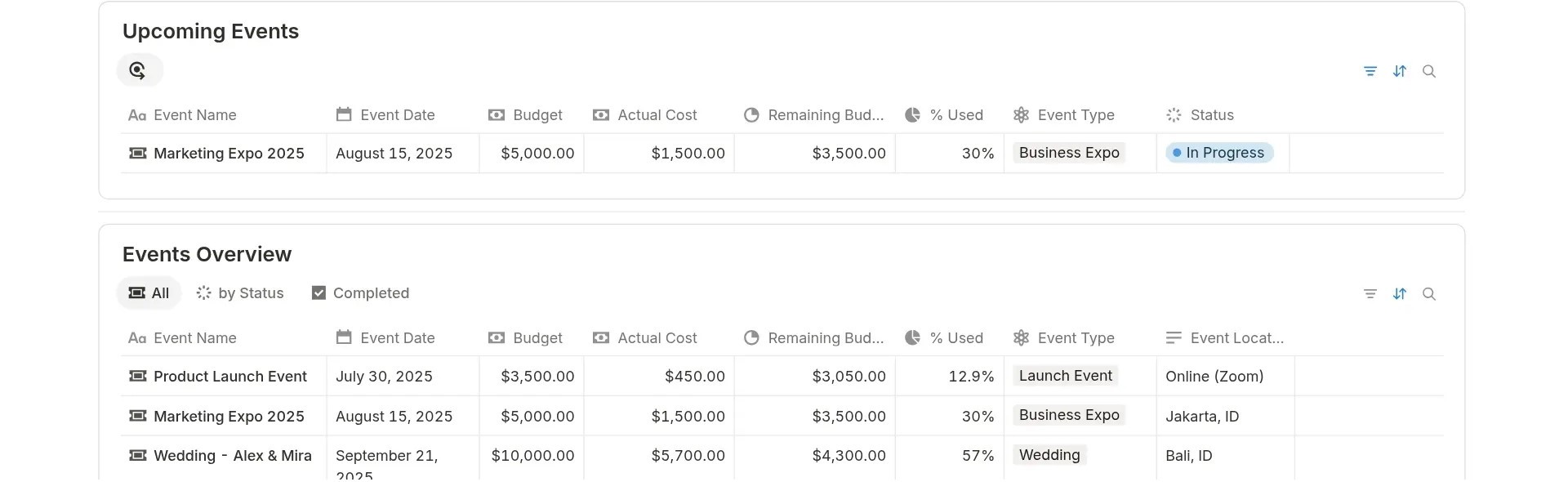
An example of an event budget plan
Focus your evaluation on the four pillars above, and you will avoid paying for features that serve a very different kind of organization.
How Mingloft Fits the Nonprofit Model
We built Mingloft for independent planners, agencies, and in-house teams who need flexibility without enterprise-level price tags.
For nonprofit coordinators specifically, that means a ticketing setup that supports donation tiers and optional giving at checkout, volunteer registration flows that live inside the same event, and reporting you can pull and send to a board member in minutes.
Our fee structure is straightforward, and we do not lock core features behind higher pricing tiers.
We know your events often run on nights and weekends with a small core team and a large group of volunteers. Our platform is designed to reduce the coordination overhead so you can focus on the mission, not the logistics.
Here's the link to get a 1-on-1 call with our team. We'll tell you if Mingloft will be suited to you.
A Quick Evaluation Checklist Before You Sign Up
Before committing to any platform, run through these questions:
Can I collect donations inside the ticket checkout without a third-party integration?
Does the pricing model work for my annual event volume and budget?
Can volunteers register and select shifts without being counted as ticket buyers?
Will my post-event reports give me the donor and attendance data my funders expect?
Is there a free trial or demo so I can test the actual workflow before paying?
If a platform cannot answer yes to most of those questions, keep looking. The right tool will make your next event easier to run and more profitable for your cause.